
MCP and coding agents
DebtDrone exposes its scanner to supported coding agents through a local
Model Context Protocol (MCP) server. The
agent starts debtdrone as a stdio process and can call one repository-scoped
tool, scan_repository, within a root that you choose. The tool does not modify
repository contents.
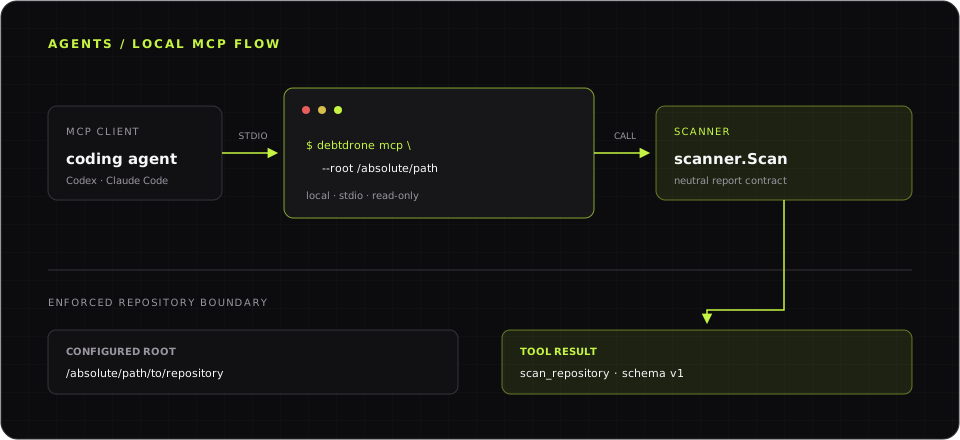 The agent and DebtDrone communicate over local stdio. Every tool path remains inside the configured root.
Before you connect an agent
Section titled “Before you connect an agent”Confirm that the installed binary exposes the MCP command and is discoverable from your shell:
debtdrone --versiondebtdrone mcp --helpcommand -v debtdroneOn Windows PowerShell, use:
debtdrone --versiondebtdrone mcp --help(Get-Command debtdrone).SourceChoose the narrowest directory the agent needs to scan and resolve it to an
absolute path. Replace /absolute/path/to/repository in the examples below
with that path. Windows examples use forward slashes so paths work in client
configuration files without JSON escaping.
Connect Codex
Section titled “Connect Codex”Add DebtDrone as a local stdio server:
codex mcp add debtdrone -- \ debtdrone mcp --root /absolute/path/to/repositoryOn Windows PowerShell, enter the same configuration on one line:
codex mcp add debtdrone -- debtdrone mcp --root C:/path/to/repositoryCodex stores MCP settings in ~/.codex/config.toml, as described in the
Codex MCP configuration guide. The
equivalent manual configuration is:
[mcp_servers.debtdrone]command = "/absolute/path/to/debtdrone"args = ["mcp", "--root", "/absolute/path/to/repository"]Use the full executable path reported by command -v debtdrone if the Codex
process does not inherit your shell PATH. You can instead use a trusted
project-level .codex/config.toml, but an absolute repository path is normally
better kept in your user configuration. On Windows, use the path reported by
(Get-Command debtdrone).Source and write it with forward slashes, such as
C:/Users/you/bin/debtdrone.exe.
Verify the registration with codex mcp list. In an active Codex session, use
/mcp to confirm that the debtdrone server is connected and exposes
scan_repository.
Connect Claude Code
Section titled “Connect Claude Code”Add DebtDrone to the current project using Claude Code’s local scope:
claude mcp add --transport stdio --scope local debtdrone -- \ debtdrone mcp --root /absolute/path/to/repositoryOn Windows PowerShell, use:
claude mcp add --transport stdio --scope local debtdrone -- debtdrone mcp --root C:/path/to/repositoryThe equivalent project-scoped .mcp.json entry follows the
Claude Code MCP configuration:
{ "mcpServers": { "debtdrone": { "type": "stdio", "command": "/absolute/path/to/debtdrone", "args": ["mcp", "--root", "/absolute/path/to/repository"] } }}Prefer local scope for a machine-specific absolute path. If you share
.mcp.json, every contributor must review and approve the server before using
it and must adapt the executable and root paths for their machine.
Verify the registration with claude mcp list. In Claude Code, use /mcp to
check the connection and available tool.
Verify a scan from the agent
Section titled “Verify a scan from the agent”Restart or reload the coding agent after changing its configuration, then send
this request. Here, . means the configured MCP root, not the agent’s working
directory:
Use DebtDrone's scan_repository tool to scan path "." withsecurity_scan set to false and max_findings set to 50. Summarize the highestseverity findings and tell me whether the result is complete or partial.The tool result uses the schema version debtdrone.scan_repository/v1. A
successful response includes status, repository, findings, warnings,
failures, and response-limit metadata. status: partial means at least one
analyzer failed while other results remained available.
scan_repository inputs
Section titled “scan_repository inputs”| Input | Default | Description |
|---|---|---|
path |
. |
Repository path relative to the configured MCP root |
max_complexity |
Resolved config (15 built in) |
Cyclomatic-complexity threshold; accepts 1 through 10000 |
security_scan |
Resolved config (true built in) |
Run the optional Trivy security analyzer |
coverage |
Resolved config (false built in) |
Parse existing coverage artifacts without executing tests |
max_findings |
200 |
Maximum returned findings; accepts 1 through 1000 |
Absolute tool paths, parent traversal, and symlinks that resolve outside the configured root are rejected. A server runs at most one scan at a time, so a second request waits until the first scan finishes or the client cancels it.
Security and privacy
Section titled “Security and privacy”- The server is a local stdio process. It does not open a network listener, authenticate to DebtDrone SaaS, or persist results there.
scan_repositoryis non-destructive to the target repository. The configured root is canonicalized before the server starts.- The MCP client controls what result content is sent to its model provider. Review that client’s data policy before scanning private source code.
- Security scanning is enabled by default. It invokes a locally installed
Trivy executable, which may access the network to update its vulnerability
database and may write to its own cache. Set
security_scantofalsefor a predictable offline first scan. - Coverage mode only reads supported artifacts already in the repository. DebtDrone does not execute repository tests through MCP.
- Successful and partial scans write the same privacy-safe local summaries as
CLI and TUI scans unless
history.enabledresolves tofalse. Because a call may append local history or update Trivy’s cache, the MCP contract does not advertise the tool as read-only or idempotent. - Treat repository content as untrusted input. DebtDrone reports findings; the coding agent remains responsible for deciding whether to take later actions.
SaaS persistence, billing, integrations, notifications, and hosted execution remain outside the CLI scanner. See System architecture and Scanner ownership for that boundary.
Troubleshoot the connection
Section titled “Troubleshoot the connection”The client cannot find debtdrone
Section titled “The client cannot find debtdrone”GUI-launched clients often inherit a different PATH from interactive
shells. On macOS or Linux, run command -v debtdrone and place the returned
absolute path in the client’s command setting. Also confirm the executable
bit and version:
ls -l /absolute/path/to/debtdrone/absolute/path/to/debtdrone --versionOn Windows PowerShell, inspect and run the discovered executable:
$DebtDrone = (Get-Command debtdrone).SourceGet-Item $DebtDrone& $DebtDrone --versionThe root is missing, invalid, or unreadable
Section titled “The root is missing, invalid, or unreadable”--root is required and must point to an existing directory. Confirm the
directory and its permissions outside the client:
test -d /absolute/path/to/repositorytest -r /absolute/path/to/repositorytest -x /absolute/path/to/repositorydebtdrone mcp --root /absolute/path/to/repositoryOn Windows PowerShell, verify that the root is a directory and start the same server command:
Test-Path C:/path/to/repository -PathType Containerdebtdrone mcp --root C:/path/to/repositoryThe last command normally appears idle because the server is waiting for MCP
messages on stdin. Press Ctrl+C to stop it. A later tool call can still report
a permission error for an unreadable file below the root.
The client reports a protocol or startup failure
Section titled “The client reports a protocol or startup failure”Configure the transport as stdio, the command as the DebtDrone executable,
and each argument as a separate item. Do not configure an HTTP URL and do not
wrap the command in a script that prints banners or logs to stdout. MCP reserves
stdout for JSON-RPC protocol messages.
Run debtdrone mcp --help to catch an unsupported release or malformed flag,
then inspect codex mcp list, claude mcp list, or the client’s /mcp panel.
Restart the client after correcting the configuration.
Diagnostics appear on stderr
Section titled “Diagnostics appear on stderr”Stderr is the diagnostic channel; stdout must remain protocol-only. Inspect the
client’s MCP logs for startup errors, but never merge stderr into stdout with
2>&1. Analyzer warnings and partial failures returned by a scan are also
available in the tool result’s warnings and failures fields.
A scan is slow, times out, or returns partial results
Section titled “A scan is slow, times out, or returns partial results”Only one scan runs per server. Wait for the current request to finish, reduce
the target with path, or retry with security_scan: false to isolate Trivy.
If the client enforces a short tool timeout, increase it only after confirming
the configured root is appropriately narrow. Inspect warnings, failures,
and truncated before assuming the response is complete.
For non-MCP installation and analyzer failures, continue with the general troubleshooting guide.