
Run your first scan
This tutorial takes you from installation to a useful local scan. It disables the optional Trivy analyzer for the first run so the result does not depend on another executable.
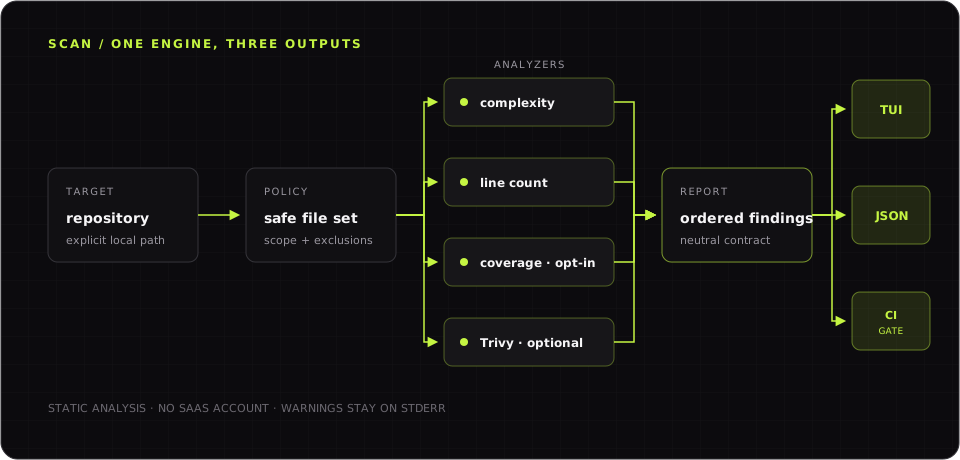 One scanner pipeline powers interactive exploration, JSON output, and CI quality gates.
1. Install DebtDrone
Section titled “1. Install DebtDrone”If you already have Go 1.25.1 or later and a C compiler, install the latest CLI release:
go install github.com/endrilickollari/debtdrone-cli/v2/cmd/debtdrone@latestConfirm that the binary is available:
debtdrone --versionIf the command is not found, add $(go env GOPATH)/bin to your PATH or use
one of the alternatives in Install the CLI.
2. Open a repository
Section titled “2. Open a repository”Change into a repository you want to inspect:
cd /path/to/your/repositoryDebtDrone accepts an explicit directory, but running it from the repository root makes paths and output easier to read.
3. Run a predictable first scan
Section titled “3. Run a predictable first scan”Run the headless scanner with text output and security scanning disabled:
debtdrone scan . --format=text --security-scan=falseA repository with findings prints a table:
SEVERITY FILE:LINE RULE MESSAGE-------- --------- ---- -------HIGH /workspace/src/service.go:42 N/A Function 'Run' has high cyclomatic complexity of 18 (threshold: 15)A repository without findings prints:
No technical debt issues found.Findings alone do not make this command fail. DebtDrone returns a quality-gate
error only when you explicitly provide --fail-on.
4. Inspect machine-readable output
Section titled “4. Inspect machine-readable output”Run the same scan as JSON:
debtdrone scan . --format=json --security-scan=falseStdout is a JSON array of findings. This makes the command suitable for shell scripts and agents. Analyzer warnings are written to stderr so they do not corrupt the JSON document.
5. Add a quality gate
Section titled “5. Add a quality gate”Fail the command when a high or critical finding is present:
debtdrone scan . --fail-on=high --security-scan=falseUse this form in CI only after reviewing the repository’s current findings. Starting with a threshold that already fails can block every change rather than preventing new debt.
6. Explore interactively
Section titled “6. Explore interactively”Launch the terminal interface from the same directory:
debtdroneEnter /scan to scan the current directory, use j and k to move through
findings, and press Esc to return to the dashboard. See the
Interactive TUI guide for the complete workflow.
Next steps
Section titled “Next steps”- Run scans in CI/CD and retain JSON reports as artifacts.
- Configure scans with explicit CLI flags.
- Enable Trivy after following its official installation instructions.
- Consult the command reference for every current command and flag.